
Peugeot 2008: Instruments / Instrument panels
Peugeot 2008 2019-2026 Owner's Manual / Instruments / Instrument panels
 Instruments
..
 LCD instrument panel
Dials
Analogue speedometer (mph or km/h)
LCD display
Rev counter (x 1,000 rpm), graduation depends on the engine (Petrol or
Diesel)
LCD display
Cruise control/speed limiter settings
Digital speedometer (mph or km/h)
Driving mode selected
Gear shift indicatorSelector position and gear on automatic gearbox
Fuel gauge
Engine oil level indicator (depending on engine)Service indicator,
then..
Other information:
Peugeot 2008 2019-2026 Owner's Manual: Thermal comfort consumption indicator (Electric)
The gauge shows the consumption of electric power for thermal comfort functions. It concerns the following equipment and systems: Heating. Air conditioning. Front demisting/defrosting. Rear screen demisting/defrosting. Heated seats. The traction battery powers the heating and air conditioning systems. This equipment and these functions can be used: If the vehicle is not plugged in, when..
Peugeot 2008 2019-2026 Owner's Manual: Speed limiter
Refer to the General recommendations on the use of driving and manoeuvring aids. This system prevents the vehicle from exceeding the speed programmed by the driver (speed setting). The speed limiter is switched on manually. The minimum speed setting is 19 mph (30 km/h). The speed setting remains in the system memory when the ignition is switched off. Steering-mounted control ON (LIMIT..
Categories
- Manuals Home
- 2nd Generation Peugeot 2008 Owners Manual
- 2nd Generation Peugeot 2008 Service Manual
- AdBlue® (BlueHDi)
- Driving modes
- Digital instrument panel
- New on site
- Most important about car
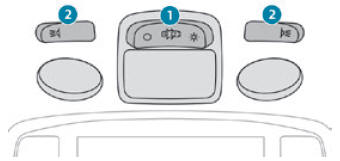
Courtesy lamps. Interior ambience lighting
Courtesy lamps
Non touch-sensitive version

Copyright © 2026 www.pe2008.net